


Et smukt skrivebord i egetræ kan miste sin charme overraskende hurtigt, når opladere, skærmkabler og strømforsyninger begynder at hænge ud over kanten. God kabelføring til træskriveborde handler ikke kun om at skjule rod. Det handler om at beskytte materialet, bevare de rene linjer og sikre, at arbejdsområdet fremstår lige så gennemtænkt som selve skrivebordet.
Når det drejer sig om et skrivebord i massivt træ, bør man gå mere forsigtigt til værks end med billigere bordplader af kompositmaterialer. Ægte egetræ udvider sig en smule med luftfugtigheden, har synlige årer og fortjener beslag, der ikke virker midlertidige eller sjusket udført. Hvis skrivebordet er højdejusterbart, er der endnu et aspekt at tage højde for: Kablerne skal kunne bevæge sig jævnt sammen med rammen uden at blive trukket i, hænge fast eller skabe spændinger over tid.
Hvorfor ledningsføring er endnu vigtigere på et skrivebord af træ
Et skrivebord af træ udstråler en visuel varme, som tilbehør af plast let kan modvirke. Løse kabler skaber rod. Selvklæbende klips i den forkerte overfladebehandling kan se ud som en eftertanke. Værre endnu: Dårlige monteringsvalg kan beskadige undersiden, efterlade rester på overfladen eller skabe trykpunkter, der bliver irriterende, hver gang man sætter sig ned.
Der er også en praktisk side ved det. Et skrivebord med synlige ledninger er sværere at rengøre, sværere at justere og som regel mindre behageligt at bruge. Man snubler over kablerne. Strømforsyningerne samler støv. Opladerkabler forsvinder bag rammen. På et ståbord bliver de uordnede kabler ofte mest tydelige, første gang man hæver bordpladen, og noget bliver strammet.
Derfor betragter de bedste løsninger kabelhåndtering som en integreret del af skrivebordets design og ikke som en efterfølgende løsning. Når eg møder teknologi, er det detaljerne, der tæller.
Den bedste ledningsføring til træskriveborde starter nedenunder
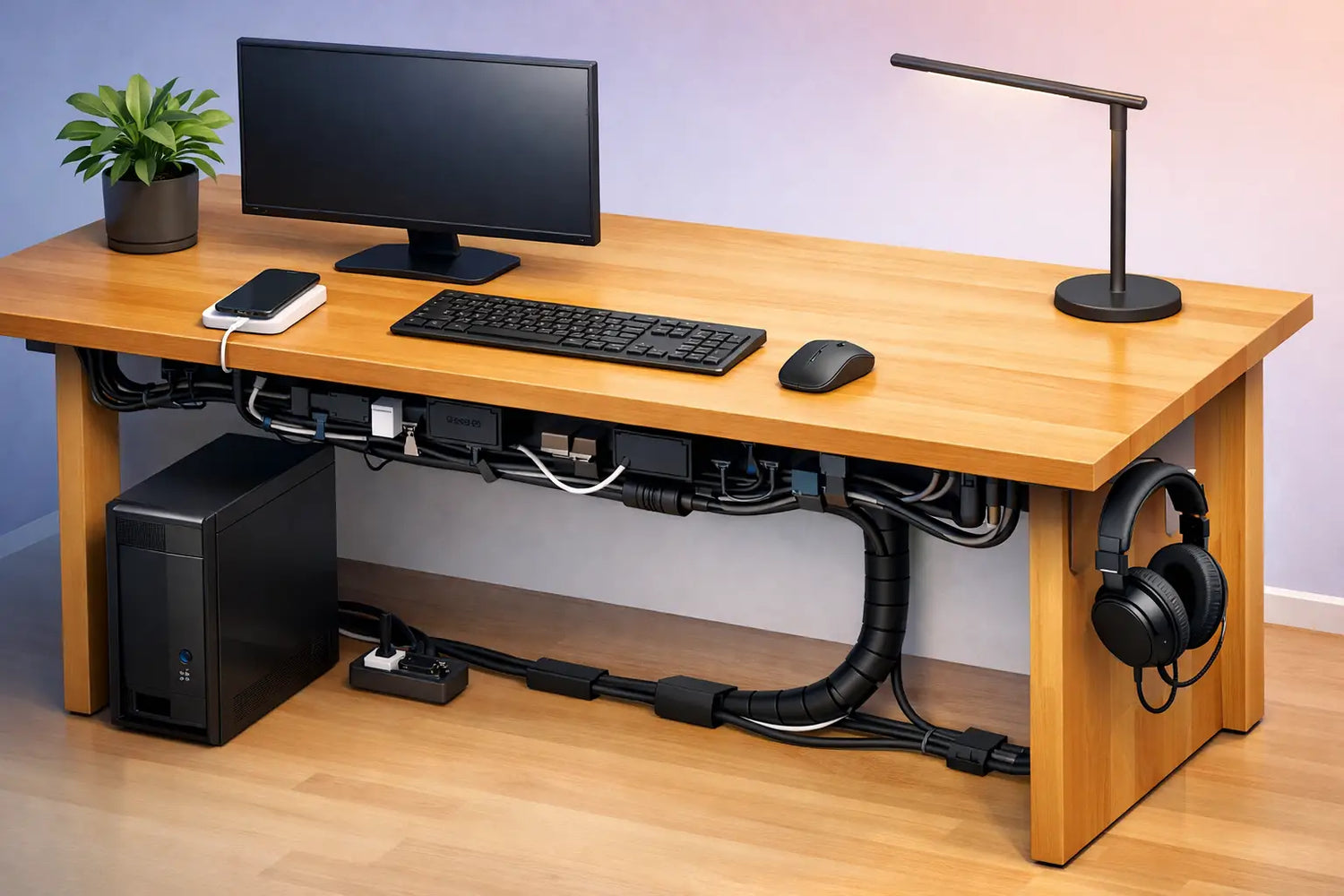
Hvis du ønsker, at dit skrivebord skal se ryddeligt ud fra alle vinkler, skal du starte med det, der befinder sig under bordpladen. I de fleste tilfælde er den pæneste løsning en kabelkanal, der monteres under skrivebordet. Den holder stikdåsen, overskydende kabellængde og adaptere væk fra gulvet og tæt på de enheder, de forsyner.
Til et skrivebord i massivt egetræ fungerer en bakke bedst, når den står i et passende forhold til bordpladen og er monteret med omtanke. Er den for lav, bliver der for trangt. Er den for stor, kan den visuelt dominere undersiden eller være i vejen for knæene, skærmarmens beslag eller skrivebordets stel. En metalbakke i den rette størrelse i sort eller en afdæmpet finish passer som regel godt til egetræ, fordi den afspejler strukturen i et moderne stel uden at konkurrere med træet.
Placeringen er lige så vigtig som selve kablebakken. Centrering er ofte det bedste valg for en afbalanceret kabelføring, men ikke altid. Hvis dit skrivebord har en bærbar-dockingstation på den ene side eller et tungere skærmsæt på den anden, kan en forskudt placering mindske unødvendige kabelsammenkrydsninger. Dette er et af de områder, hvor der ikke findes ét enkelt perfekt svar. Den pæneste løsning er ganske enkelt den korteste fornuftige rute.
Skruemonterede eller selvklæbende løsninger?
Når det gælder skriveborde i høj kvalitet, er skruemonteret kabelstyring som regel det bedste valg på lang sigt. Det er mere sikkert, især på skriveborde, der kan indstilles til både siddende og stående arbejde, og det undgår det almindelige problem, at selvklæbende dele med tiden løsner sig på grund af varme, støv eller bevægelse. Et produkt, der er omhyggeligt håndlavet, bør ikke ende med, at en plastikklips falder af efter seks måneder.
Det afhænger dog af tilbehøret og overfladebehandlingen. Små selvklæbende klips kan være nyttige til lettere fræsning, især når man ikke ønsker flere fastgørelsespunkter under bordpladen. Men de bør vælges med omhu og bruges sparsomt. På ægte træ kan klæbemidler af lav kvalitet efterlade rester eller løsne sig ujævnt. Hvis du bruger dem, skal du først afprøve placeringen og undgå at overbelaste dem.
Planlæg kabelføringen, inden du monterer noget
Den største fejl, man kan begå i forbindelse med kabelstyring, er at købe tilbehør, før man har planlagt opsætningen. En bedre fremgangsmåde er at placere skrivebordet, montere skærmarmen, hvis man bruger en sådan, placere sine enheder der, hvor de rent faktisk skal stå, og derefter kortlægge, hvordan de enkelte kabler skal føres.
De fleste skriveborde skal kun håndtere fem kategorier af kabler: strøm til skærmen, signalskabel til skærmen, strøm til bærbar computer eller dockingstation, perifere enheder samt en enkelt strømforsyning fra skrivebordet til stikkontakten. Når man først ved, hvor disse kabler starter og slutter, bliver det nemmere at forenkle kabelføringen.
Prøv at holde kabelføringen i tre lag. Det første lag er på skrivebordets overflade, hvor kun de kabler, der bruges dagligt, bør være synlige. Det andet lag er langs bagkanten eller undersiden, hvor kablerne føres hen mod kabelbakken. Det tredje lag er det enkelte, kontrollerede fald fra skrivebordet ned til stikkontakten på gulvet. Hvis disse tre lag er overskuelige, fremstår hele skrivebordet som velordnet.
Ståborde kræver en bevægelsesrutine
På et skrivebord med fast højde kan man føre kablerne tæt sammen. På et højdejusterbart skrivebord i egetræ skal der være lidt slæk på det rigtige sted. Ikke for meget, ellers ser det rodet ud. Ikke for lidt, ellers vil rammen trække i kablerne, hver gang man ændrer højden.
Den bedste metode er en kontrolleret bevægelsessløjfe mellem kabelbakken og gulvet. Denne sløjfe skal hænge pænt, kunne bevæge sig frit og må aldrig skrabe skarpt mod rammen. Kabelholdere kan være en hjælp her, men de skal passe ind i skrivebordets udseende. Nogle ser alt for tekniske ud. Andre er diskrete nok til at passe ind i et designorienteret interiør.
Hvis dit skrivebord står midt i rummet i stedet for op ad en væg, bliver det endnu vigtigere at føre kablerne fra gulvet op til skrivebordet. I så fald handler kabelhåndtering ikke kun om at holde orden. Det bliver en del af rummets visuelle helhed.
Vælg tilbehør, der passer til materialet
Ikke alt kabeltilbehør passer til et skrivebord af massivt træ. De billigste plastbakker, skinnende hvide klemmer eller klodsede krogsystemer virker ofte malplacerede i forhold til egens karakter. Et bedre valg er beslag med en tilbageholden æstetik: pulverlakeret stål, enkle former og overfladebehandlinger, der understøtter i stedet for at distrahere.
Der er også et taktilt aspekt at tage højde for. Ægte træ indbyder til berøring. Man mærker kanterne, åretegningen og vægten. Tilbehør bør ikke forstyrre denne oplevelse med skarpe hjørner eller generende fremspring. Dette gælder især, hvis man sidder tæt på undersiden af skrivebordet eller bruger en bordplade med lav dybde.
Et arbejdsområde i topklasse vinder ved at have færre, men bedre ting. En solid bakke, et par velplacerede klemmer og en ordentlig afstandsmåler mellem skrivebord og gulv gør som regel mere nytte end en samling af tilfældige tilbehørsdele.
Typiske fejl ved kabelføring til træskriveborde
En af de mest almindelige fejl er at montere alt lige under den forreste halvdel af skrivebordet. Det virker praktisk under monteringen, men det skaber ofte et rod i det visuelle indtryk, når man sidder ved bordet, og kan gøre det mindre behageligt at sidde med benene. Kabelføringen bør så vidt muligt foregå bagtil.
En anden fejl er at lade strømforsyningerne ligge løst i en bakke uden afstandsstykker. De afgiver varme, samler støv og kan rasle, når skrivebordet bevæger sig. Lidt afstand gør en stor forskel. Målet er ikke blot at skjule kablerne. Det handler om at skabe orden under skrivebordet.
Kabelbindere, der er strammet for hårdt, udgør et andet problem. De kan med tiden belaste ledningerne og gøre fremtidige ændringer besværlige. Genanvendelige fastgørelseselementer er som regel det klogeste valg, især hvis din opsætning kan komme til at ændre sig med en ny skærm, en dockingstation eller en lampe.
Så er der »finish-blindhed«: at vælge praktisk tilbehør, der fuldstændig ser bort fra skrivebordet. En bordplade i massivt egetræ har karakter. Kabelføringen bør passe til det kvalitetsniveau. »Bygget til at holde hele livet« gælder også detaljerne, ikke kun bordpladen.
Et mere ryddeligt skrivebord er nemmere at leve med
Der er en grund til, at det føles mere roligt at arbejde ved et velorganiseret skrivebord. Øjet bliver ikke konstant distraheret. Det kræver mindre arbejde at gøre rent. Det er nemmere at trække stik ud af enhederne og sætte dem på plads igen. Skrivebordet kan hæves og sænkes uden besvær. Man får de kvaliteter, man oprindeligt betalte for: egetræet, silhuetten, følelsen af orden.
For dem, der køber møbler til hjemmekontoret, er dette endnu vigtigere, da skrivebordet ofte står i et soveværelse, en stue eller et fællesrum. Et synligt kabelvirvar under en håndlavet bordplade kan få hele rummet til at virke ufærdigt. En pæn kabelføring sikrer ikke blot funktionaliteten, men også stemningen.
Hos OAKO Denmark er det netop denne balance mellem ægte materialer og moderne funktionalitet, der kendetegner et godt arbejdsmiljø. Et skrivebord i træ af høj kvalitet bør aldrig tvinge dig til at vælge mellem skønhed og praktisk anvendelighed.
Sådan opnår du det bedste resultat på længere sigt
Den mest effektive kabelopsætning er sjældent den mest komplicerede. Det er den, du kan vedligeholde. Sørg for, at der er plads nok til at nå stikdåsen. Mærk kablerne, hvis du har flere enheder tilsluttet. Hav et ekstra opladerkabel klar, så du ikke behøver at pakke hele bakken ud hver gang, du skal have strøm til noget nyt.
Det er også en god idé at gennemgå opsætningen efter en uges praktisk brug. Du vil måske opdage, at et kabel kommer ind fra den forkerte side, at bakken er for overfyldt, eller at der skal mere slæk på kablerne, end du havde regnet med. Små justeringer er helt normale. Faktisk er det ofte netop disse, der adskiller en acceptabel opsætning fra en, der føles fuldt integreret.
Kabelføring til træskriveborde skal være diskret, holdbar og stå i harmoni med selve møblet. Når det er udført korrekt, forsvinder det næsten helt. Og det er netop pointen. Det er egetræet, man først lægger mærke til, ikke den teknologi, det understøtter.
Et veludført skrivebord skaber i sig selv struktur i rummet. En gennemtænkt kabelhåndtering sørger blot for, at denne struktur forbliver synlig, dag efter dag.


Efterlad en kommentar
Dette websted er beskyttet af hCaptcha, og hCaptchas privatlivspolitik og servicevilkår gælder.